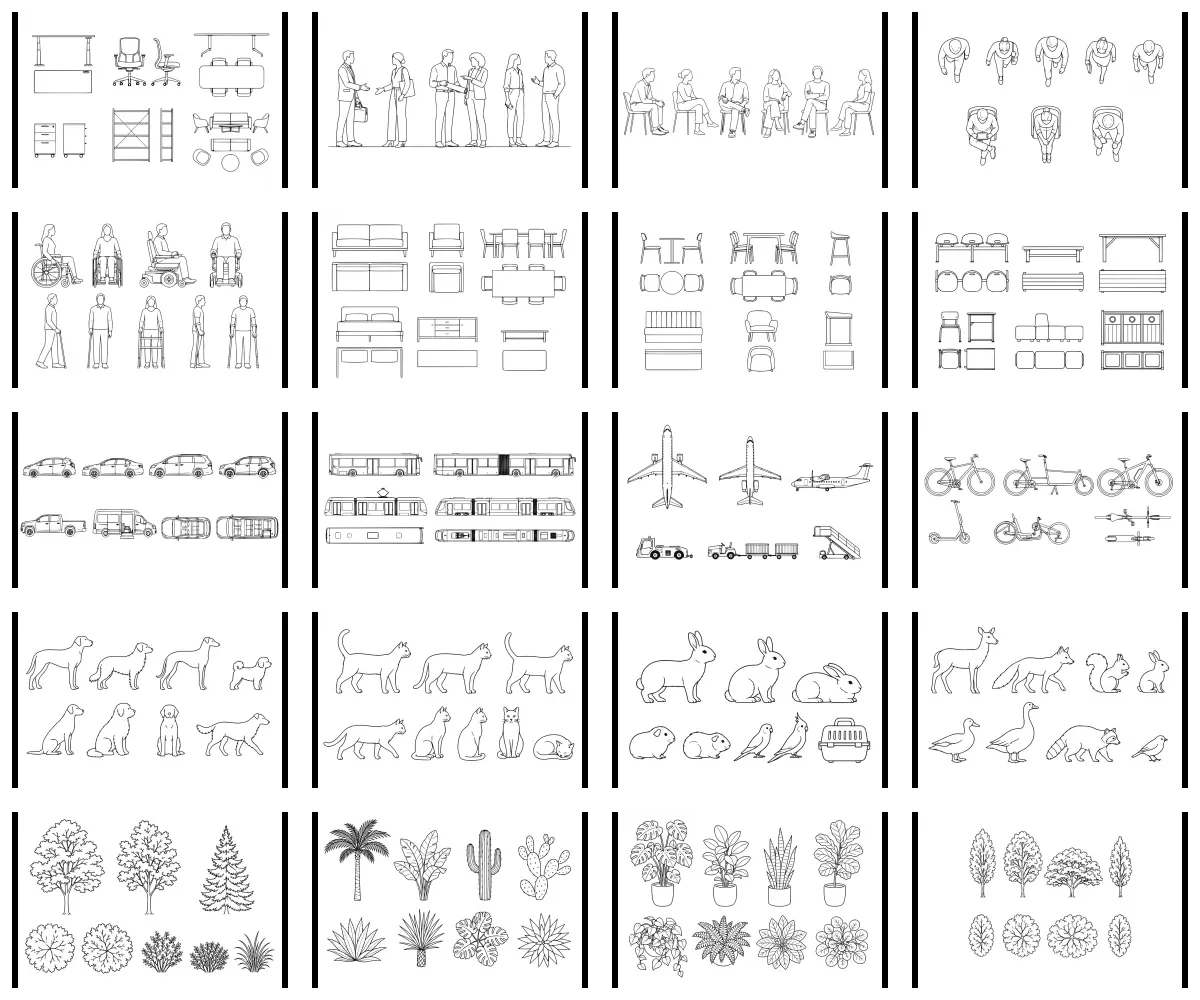
Complete Architectural Entourage Prompt Collection
by Render Standard
Generate people, furniture, mobility, vehicles, animals, and planting from 20 prompt-only architectural entourage systems.
Collection 0 downloads
archiPrompt
Use tested prompts for visualization, documentation, analysis, coordination, and project delivery—each with clear inputs, outputs, and compatible tools.
Tested compatibility
Prompts, skills + integrations
Find architecture Prompts to download, learn how packaged skills work, install verified MCP connections, or explore guidance by design software.
Downloadable packages
Find tested packages for visualization, documents, coordination, modelling, and project delivery.
Browse PromptsReusable capabilities
Understand how reusable AI skills bundle instructions, scripts, references, and assets for repeatable work.
Understand AI skillsTool connections
Follow source-checked installation guides for connecting AI assistants to tools such as Rhino and Grasshopper.
Install Rhino MCPDesign applications
Explore guidance and Prompts for Rhino, Grasshopper, Revit, BIM, visualization, documents, and more.
Browse software topicsArchitecture prompts people are finding most useful right now.
Nothing is trending yet.
Browse the catalogue and vote for Prompts you find useful.
A starting set across due diligence, drawing coordination, briefing, and controlled visualization. Every listing names its input, output, compatible tools, and professional-review boundary.
by Render Standard
Generate people, furniture, mobility, vehicles, animals, and planting from 20 prompt-only architectural entourage systems.
by Assembly Works
Convert a client brief, room data, and stakeholder notes into a traceable accommodation programme.
by Section Nine
Review a PDF drawing set and produce a categorized, evidence-linked multidisciplinary coordination register.
by Render Standard
Generate bounded material and lighting studies while explicitly preserving source geometry and camera position.
The newest architecture Prompt packages on archiPrompt, ordered by their actual publication date. New labels remain for 14 days.
by Northline Technical
Three contractor-first prompts for visual change orders, source-traceable estimates, and e-sign-ready proposals from simple residential project photos or plans.
by Northline Technical
Package reviewed residential scope, pricing, renders, and details into a polished proposal with mapped signature fields and issue preflight.
by Northline Technical
Build a source-traceable residential estimate, scope visuals, proposed render, and conceptual details from simple project photos or plans.
by Northline Technical
Turn residential photos or plans plus a scope change into matched renders, details, cost and schedule deltas, and a review-ready change order.
by Assembly Works
Generate desks, meeting settings, task chairs, and storage as consistent office-planning vector symbols.
by Render Standard
Create palms, broad-leaf plants, cacti, agaves, and arid shrubs with consistent graphic conventions.
First-party specialists
These are archiPrompt-operated specialization profiles, not invented third-party sellers. Each one owns a clear architectural subject and carries the archiPrompt Studio disclosure.
Architectural programming studio · Toronto, Canada
Client brief + programming · Design + visualization
Technical architecture studio · Vancouver, Canada
Construction administration · Specifications + material research

Architectural visualization studio · Copenhagen, Denmark
Design + visualization
Architecture and BIM coordination · Melbourne, Australia
Documentation + QA · Design + visualization

Architectural research practice · London, UK
Site + zoning · Site + climate

Architecture and design strategy · New York, USA
Procurement + consultant comparison · Research + precedents
archiPrompt delivers a reusable package rather than running the work for you. The preview shows the literal path from checkout to your LLM and named production application.
Step 01
Search by architectural task, output, phase, discipline, or compatible tool.
Step 02
Inspect the inputs, public method, sample output, limitations, and exact package version.
Step 03
Purchase through Stripe, open the version in your Library, and download its authorized package.
Live install + output preview
Purchase the Prompt, add its file to ChatGPT, enter your project-specific instruction, and review the result in Adobe Illustrator.
21 Prompts
Prompts for model quality control, schedules, issue exchanges, office rules, and coordinated BIM evidence.
1 Prompt
Methods for turning stakeholder needs, room information, and project objectives into traceable programme deliverables.
1 Prompt
Evidence-led support for identifying candidate accessibility and code issues before qualified professional review.
1 Prompt
Prompts for narratives and presentations that connect competition claims to project facts and submission requirements.
5 Prompts
Controlled drafting and tracking methods for RFIs, responses, attachments, actions, and construction-phase correspondence.
28 Prompts
Architecture-specific prompt systems for controlled material, lighting, and representation studies with declared fidelity limits.
1 Prompt
Repeatable review systems for drawing sets, coordination responsibilities, issues, and completion evidence.
1 Prompt
Reusable methods for project closeout, lessons learned, knowledge capture, and practice-wide decision records.
1 Prompt
Prompts for comparing consultant proposals, issued scopes, exclusions, fees, and evaluation criteria.
1 Prompt
Question-led precedent research methods that organize comparable evidence, citations, and project-specific implications.
1 Prompt
Prompts for turning site, climate, context, and public-realm evidence into opportunity diagrams.
1 Prompt
Prompts for early planning research, site constraints, zoning questions, and qualified review flags.
1 Prompt
Source-led specification and material-research methods that expose assumptions, exclusions, and review decisions.
Every product page makes the professional boundary visible before price or purchase enters the flow.
Required files, accepted formats, project stage, and setup questions.
A public step overview, variables, dependencies, and quality checks.
A named deliverable, format or schema, and a redacted example.
Limitations, jurisdiction, risk level, and qualified human review.
For architecture experts
Apply for early creator access. Approved creators will be able to publish architecture-specific Prompt products and earn from their sales when external creator commerce opens.
Learn
Original guidance tied to marketplace tasks: how to evaluate a package, retain evidence, and keep professional review visible.
Eleven practical Rhino resources for architecture students—covering site context, terrain, blocks, vectors, hatches, textures, HDRIs, display modes, environmental analysis, and BIM—with the archiPrompt workflows that support each stage.
By Stefan Miller · Updated Aug 2026
Read articleA practical, plain-English review of Dynamo 4.2’s Autodesk Assistant, DynamoMCP, templates, BIM controls, graph fixes, compatibility, and rollout limits.
By Stefan Miller · Updated Aug 2026
Read articleA beginner guide to downloading Dynamo 4.2 Sandbox, opening Autodesk Assistant, confirming the built-in DynamoMCP connection, testing it safely, and understanding the current Revit limits.
By Stefan Miller · Updated Aug 2026
Read guideQ&A
Clear answers about what is sold, how delivery works, and where professional responsibility remains.
A downloadable, architecture-specific AI prompt package with defined inputs, clear instructions, expected outputs, limitations, and a representative result.
The exact files named on the listing, including the main prompt, setup guidance, sample input and output, limitations, and version record.
No. You download the package and use it with the named LLM and production software. The listing shows that install and output path before purchase.
No. Outputs remain working material and require the qualified human review stated on the listing. They do not replace professional judgment, code interpretation, or approval.
Yes. A purchased version stays in your buyer Library, where you can review its changelog and request an authorized package download.
No. Existing one-time prices stay available without a subscription. A subscription is an optional way to acquire qualifying catalogue products each month, and you can still buy any item separately.
Only the first addition of a product counts. Starter includes 10 and Professional 30 individual products per monthly UTC anniversary window; Business is unlimited and includes Collections. Re-downloads and current-version updates do not consume more quota.
External creator access is currently waitlisted. Apply with your specialization and proposed product; commercial terms are confirmed before anything is published.
Talk to the founder + CEO
Send the context directly. For a call, request a time and a calendar link will follow by email.
Response target
Within one business day
Direct replies from archiPrompt—not a generic support queue.