
PromptLow riskVersion 1.2.0

Standing People Linework System

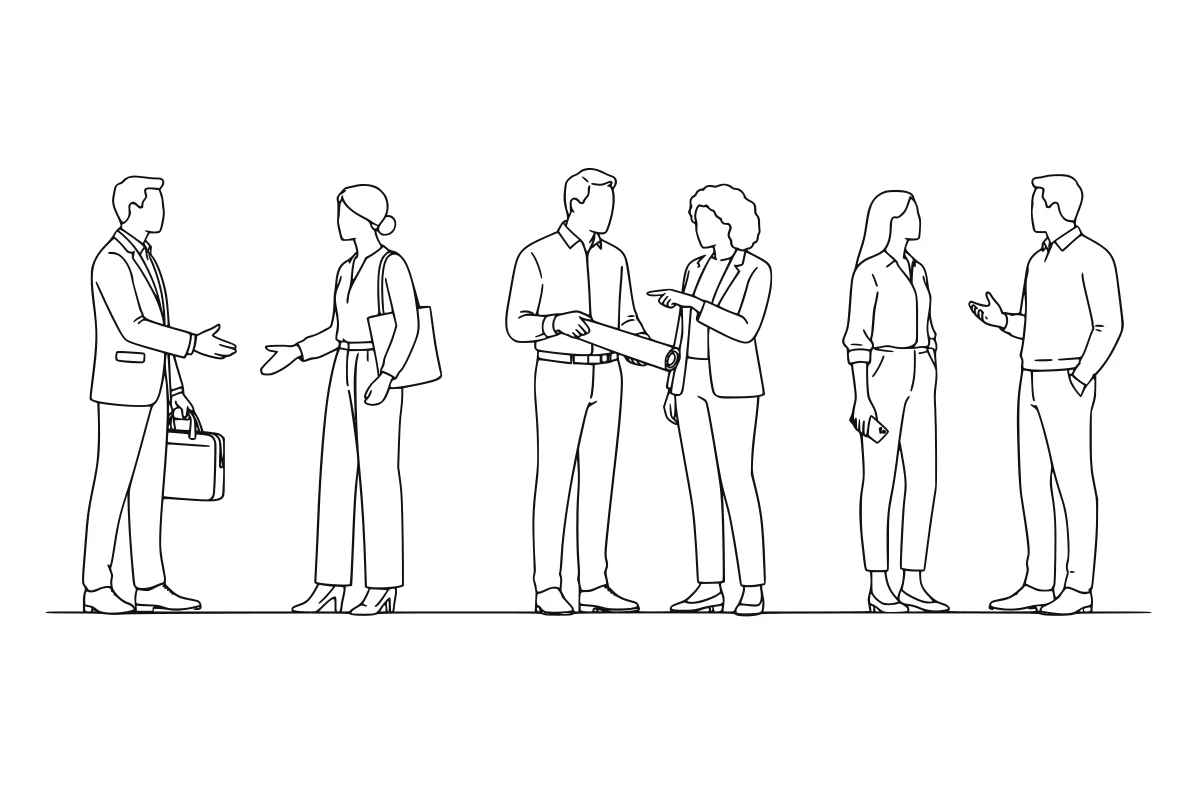
Standing people elevation SVG set shown as a rendered representative vector-output preview Shown in Adobe Illustrator as a representative output—not a guaranteed unreviewed result.

Generate consistent standing people in front and side elevation for sections, elevations, and presentation drawings.

Part of Complete Architectural Entourage Prompt Collection

Who it is for

Architecture · Interiors · Landscape

Architectural plans

What it produces

Six visibly diverse professional adults in three conversational pairs, delivered without a ground line in one verified SVG with unchanged subject paths separated into outline and detail layers.

Image-first traced grouped SVG + embedded style contract + Illustrator QA checklist

  • ChatGPT
  • Adobe Illustrator

Compatibility tested Jul 2026

What you provide

  • Subject list · required
    Text brief
  • View + reference dimension · required
    Plan/elevation + millimetres
  • Drawing scale + file name · required
    Scale ratio + SVG file name
  • Office graphic rules · optional
    Text checklist

Review boundary

Every generated SVG is a graphic starting point. The designer must review anatomy, scale, clearances, line joins, and office standards before project use.

01

Input → method → output

The public process and a redacted example are visible before purchase.

How to install

Purchase the Prompt, add its file to Claude, enter your project-specific instruction, and review the result in Adobe Illustrator.

Purchase the Prompt, add its file to Claude, enter a sample instruction, and review the generated Adobe Illustrator deliverable.

SAMPLE INPUT

Subject list + View + reference dimension + Drawing scale + file name + Office graphic rules

PROCESS PREVIEW

5 controlled steps with quality checks

EXPECTED OUTPUT

Image-first traced grouped SVG + embedded style contract + Illustrator QA checklist

Redacted output preview

Standing people elevation SVG set

ChatGPT image-to-vector entourage

Output
SVG
Source art
Not included
Method
Image → trace

Listing-aligned trace source

ChatGPT creates six visibly diverse professionally dressed adults as three conversational pairs, with natural gestures, a compact no-ground composition, and varied three-quarter/profile architectural elevations.

Local LOD verification gate

Each person's LOD0 perimeter, LOD1 structure, and LOD2 fine detail must independently pass feature-region, occupied-tile, topology, stroke-width, 99.5% bidirectional, G1 continuity, and 0.75px local-deviation checks before accepted paths are moved unchanged into their semantic layers.

Rendered preview · image-first SVG trace · Illustrator review required

02

What it does

Generate standing people that match the embedded listing specification's compact conversational architectural-entourage character: six visibly racially and ethnically diverse professional adults arranged as three gesturing pairs with no ground line or contextual geometry, varied three-quarter and profile views, respectful non-caricatured human variation, faithful exterior paths, lighter interior detail, wobble-free intended straight edges, and credible clothing detail. ChatGPT first creates and rejects or corrects a listing-aligned black-on-white trace source, then converts each visible mark into one verified SVG centreline stroke. The trace operates at native 1536×1024 scale, refines skeleton topology to a grayscale-weighted subpixel centreline, uses G1-continuous cubic curves, and rejects local deviations over 0.75px even when aggregate scores pass. Independent LOD0, LOD1, and LOD2 checks verify every feature region, occupied adaptive tile, graph topology, and rendered stroke width so large contours cannot conceal missing fine detail. After the trace is accepted, layer organization must preserve every subject path exactly. No reusable reference drawing is included, and the workflow fails closed when the composition, representation, geometry fidelity, source image, or SVG does not meet the advertised result.

Six visibly diverse professional adults in three conversational pairs, delivered without a ground line in one verified SVG with unchanged subject paths separated into outline and detail layers.

Designed for

  • Architectural plans
  • Architectural sections and elevations
  • Presentation diagrams
  • Illustrator entourage libraries

03

Included files + delivery

README.mdMarkdownSetup, use, and professional boundary
PROMPT.mdMarkdownPrimary workflow entry point
variables.jsonJSONInputs and output configuration
sample-input.mdMarkdownRepresentative input structure
sample-output.mdMarkdownRepresentative output structure
manifest.jsonJSONPackage contract and permissions
qa-report.jsonJSONValidation and review record
linework-structural-filter.pyPythonMandatory deterministic structural SVG producer and verifier
linework-centreline-core.pyPythonBundled centreline graph-extraction dependency for the structural filter

Delivered as a versioned ZIP package. After verified payment, the exact purchased version is available through the buyer's private Library.

04

Prompt steps

  1. 01

    Open Work mode + load the prompt

    Open ChatGPT Work mode, then upload PROMPT.md or paste it in. Work mode is required for image generation, Python tracing, and the downloadable SVG; no external reference drawing is required.

  2. 02

    Set the subject controls

    Name the required objects, poses, views, dimensions, scale, and variants; the package uses a fixed family SVG filename for reliable delivery.

  3. 03

    Generate the trace source

    ChatGPT generates, self-reviews, and automatically corrects the controlled black-on-white orthographic image before tracing.

  4. 04

    Trace + verify the SVG

    Trace the accepted image into clean editable centreline stroke paths and verify the SVG matches its silhouettes, openings, spacing, and detail.

  5. 05

    Review in Illustrator

    Check scale, proportions, paths, originality, and legibility in Illustrator before project use.

05

Limitations + professional safety

Low risk · human review required

Every generated SVG is a graphic starting point. The designer must review anatomy, scale, clearances, line joins, and office standards before project use.

Jurisdiction: Not jurisdiction-dependent

Known limitations

  • Requires ChatGPT image generation; compatibility with text-only or image-analysis-only clients is not advertised
  • The intermediate generated image and final SVG vary by request; the published listing is representative rather than embedded source artwork
  • Generated vector geometry may contain awkward curves, excess anchor points, or centreline-path issues
  • Proportions are illustrative and are not measured product, accessibility, or clearance data
  • Output must not reproduce proprietary blocks, branded products, or identifiable protected drawings

06

Security + quality

Declared permissions

  • No shell execution
  • No background network access
  • No complete source drawing or reusable reference artwork is included

Completion checks

  • Every subject is isolated in a named SVG group and consistently scaled
  • The final SVG matches the accepted generated image's subject count, silhouettes, internal gaps, spacing, and proportions
  • Finished marks are clean editable centreline stroke paths without filled masks, doubled outlines, or primitive shortcuts
  • Silhouette quality, plausible proportions, Bézier continuity, detail density, and negative space receive designer review
  • No cartoon, pictogram, embedded raster, script, external dependency, branding, or proprietary traced geometry is accepted
  • The SVG parses as XML and opens in Adobe Illustrator
Package structure reviewedVersion 1.2.0Tested Jul 2026

07

Install + use

01

Download

Receive the immutable versioned ZIP package.

02

Read

Open SKILL.md or the named Prompt entry point.

03

Prepare

Collect required inputs and remove sensitive data.

04

Run + review

Execute in a tested tool, then complete human review.

08

Reviews + trust

No public reviews yet

Synthetic ratings and review counts are not displayed.

Verified purchase requiredVersion-specificCreator response supported

Public reviews are withheld until the marketplace can verify purchase entitlement and support a trustworthy, version-specific review process.

09

Creator

Fictional portrait representing Render Standard

Render Standard

archiPrompt Studio

Architectural visualization studio · 9 years · Copenhagen, Denmark

Visualization practice developing controlled image workflows that preserve design intent and source geometry.

A first-party specialization account operated and approved by archiPrompt.

View creator profile

10

FAQ + support + changelog

Does this create a finished Illustrator file?

It produces editable SVG that opens in Illustrator. A designer still needs to inspect paths, proportions, stroke weights, and file structure before saving an AI master.

Does it copy existing entourage libraries?

No. The prompt explicitly requires original geometry and prohibits tracing or reproducing proprietary entourage, branded products, or supplied protected blocks.

Support

Email support for setup and documented compatibility issues

Latest changelog

v1.2.0 embeds its complete listing-aligned composition and detail ceiling directly in the buyer prompt, so no external preview or reference file is required; internal release QA still compares against the immutable earlier release published listing. The workflow traces at native 1536×1024 scale, verifies LOD0/LOD1/LOD2 geometry locally, preserves the complete 2.4px exterior and 1.2px internal hierarchy, and remains blocked for a fresh owner test. Publication remains an explicit owner action.

Updated Aug 20, 2026
Not jurisdiction-dependent

Related guidance

Evaluate the method before you use it.

Read the relevant evidence and professional-boundary guidance for this Prompt and its task area.

Related Prompts

Selected from shared project phases, disciplines, compatible tools, and adjacent deliverables—not generic popularity.

View all Prompts
Back to browse

Privacy choices

Choose what archiPrompt measures.

Necessary

Authentication, checkout, security, and remembering this choice.

Always on

Marketing tracking and session replay are not in use. You can change this choice at any time from the site footer.