How to write a residential change order clients can understand
How contractors can combine a project markup, matching materials, itemized scope, price delta, schedule effect, and approval record in one change order.
Direct answer
Answer
A clear residential change order connects the requested change to the original scope, marks up the affected area, lists matching materials and work items, states the cost and schedule delta, and records approval before the changed work proceeds.
01
Connect the change to the original scope
Identify the project, original agreement or scope item, request date, requester, and reason for change. Describe the current condition and proposed change separately so the client can see what is different.
Avoid vague phrases such as 'upgrade exterior.' State the affected canopy, posts, finish, fixture, or other assembly.
02
Make the affected area visible
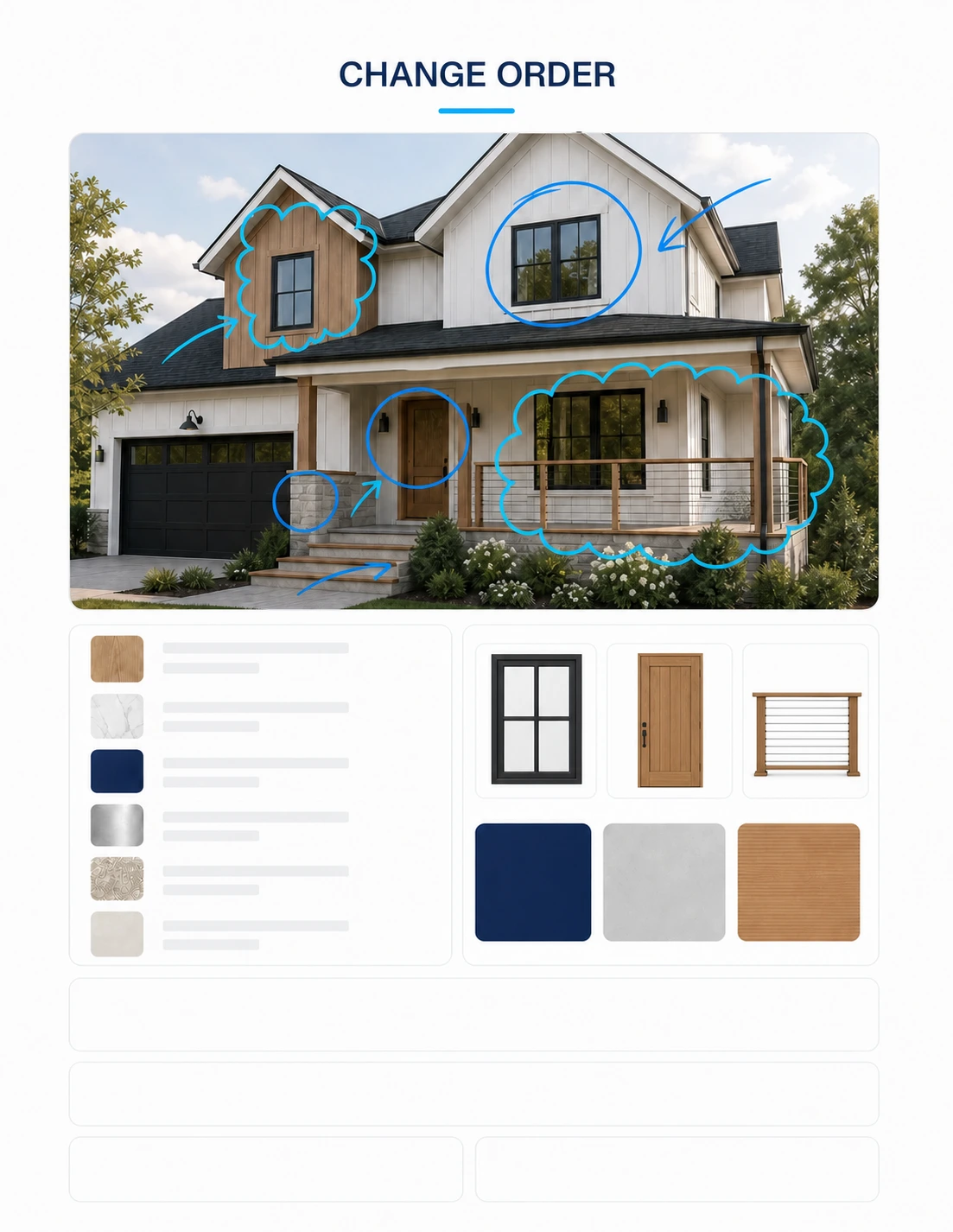
Place a colour markup over the supplied exterior image or rendering and highlight only the affected work. Pair it with product or material references that correspond to the markup rather than decorative samples unrelated to the change.
The visual should help a homeowner locate the change quickly; the written item list remains the controlling description to review.
- — One marked-up project view
- — Matching material or product references
- — Short itemized description
- — No unrelated plan or detail imagery
03
State price and schedule effects
List added work, omitted work, labour, material, equipment, subcontractor, permit, and tax effects. State the net change to contract price and the expected schedule effect, including unknowns that require confirmation.
04
Separate draft from authorization
Include a clear approval state and signature or acknowledgement area appropriate to the contractor's process. Confirm who may authorize the change and do not represent a draft as approved until the required acceptance is recorded.
REVIEW BEFORE USE
Known limitations
- Contract notice, authorization, and payment requirements vary; the generated document must be checked against the signed agreement and applicable law.
- A visual markup communicates scope but does not establish dimensions, concealed conditions, or final installation requirements.
These guides support Prompt evaluation and do not replace project-specific advice, code interpretation, consultant coordination, or qualified professional review.
Reviewed by archiPrompt Studio · Editorial + product review
RELATED ARCHITECTURE PRODUCTS
Put this article into practice
Construction administration Prompt
ChatGPT for Residential Construction — Change Orders
Turn residential photos or plans plus a scope change into matched renders, details, cost and schedule deltas, and a review-ready change order.
- Output
- ChatGPT for Residential Construction — Change Orders standalone prompt
- Tested
- ChatGPT Work mode
- GPT Image 2
- +2
- Price
- Checking access…
Construction administration Collection
ChatGPT for Residential Construction Collection

Three contractor-first prompts for visual change orders, source-traceable estimates, and e-sign-ready proposals from simple residential project photos or plans.
- Output
- 3 linked standalone residential prompt systems
- Tested
- ChatGPT Work mode
- GPT Image 2
- +2
- Price
- Checking access…
Compare the wider task inventory on the Construction administration task page.